06 - Entwicklung einer App mit KI per Spezifikation, Design
![Eugen [WebDucer] Richter](/media/authors/me_hu_f0d52c1791746385.webp)
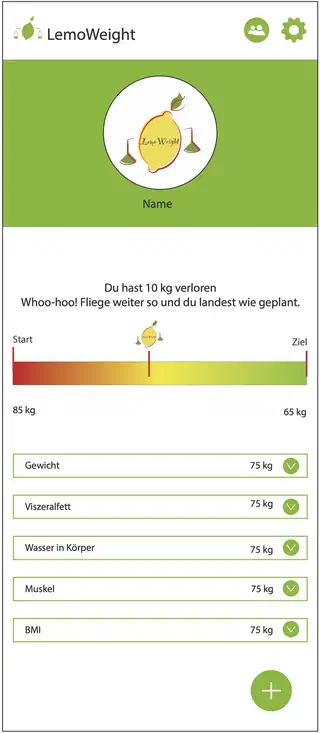 Designvorlage
In der Zwischenzeit ist OpenSpec 1.2 erschienen, mit schlankerem Workflow. Ich wechsle auch vom OpenCode (Bezahlen pro Token), direkt zu Claude Code Pro Plan (18,-€ / Monat). Das Kontingent / Limits reichen für private Projekte, dürften aber zu klein sein für Vollzeit-Entwickler.
Mit openspec init habe ich Claude Code für OpenSpec vorbereitet. Mit openspec config profile core wurde der schlankere Workflow konfiguriert und mit openspec update die aktuellen Commands und Skills im Projekt aktualisiert.
Nun möchte ich ein schöneres Design für die App umsetzen. Von einem befreundeten Designer habe ich folgende Vorlage erhalten, die ich als Beitragsbild für diesen Artikel verwendet habe.
Um diese Vorlage umzusetzen, habe ich in Claude Code mit /opsx:explore OpenSpec in den explorativen Modus versetzt.

Nach der Prüfung des Bildes und des Codes wurden zunächst einige Punkte geklärt:
Should the new measurement types (Viszeralfett, Wasser in Körper, Muskel, BMI) be real tracked data stored in the database, or just UI placeholders shown in the cards?

Should the overall app color scheme change from purple to green throughout the entire app, or only the main page?

For the progress bar (Start → Ziel), where should the user set their goal weight? (New field in Settings page, or somewhere else?)

For the user name shown in the profile section, should we add a name field to settings?
Erstellter Plan von Claude Code
Claude’s Plan
Plan: LemoWeight Design Redesign
Context
The user provided a mockup showing a complete visual redesign of the app’s home screen and brand theme. The app is currently using a purple color scheme — the new design uses a green (“LemoWeight”) brand identity. The redesign covers: a new green color theme app-wide, a redesigned MainPage with profile banner, progress bar toward goal weight, and body measurement cards (with placeholder data for all except weight).
Changes Overview
1. Color Scheme (whole app) — Colors.xaml + Styles.xaml
File: BodyMeasurement/Resources/Styles/Colors.xaml
Replace purple palette with green:
- Primary: #512BD4 → #8CB43E (olive-lime green)
- PrimaryDark: #ac99ea → #6E9E2D
- Secondary: #DFD8F7 → #E8F5D0
- Tertiary: #2B0B98 → #5A8020
- Magenta: #D600AA → #8CB43E (reuse as tab bar accent, was Magenta)
- MidnightBlue: #190649 → #2D4A10 (dark green for Headline style)
- Add LemoGreen: #8CB43E (named alias for use in MainPage)
File: BodyMeasurement/Resources/Styles/Styles.xaml
- Shell TabBarForegroundColor and TabBarTitleColor: already uses Magenta resource — will update automatically once Magenta changes to green.
- Headline/SubHeadline TextColor: uses MidnightBlue → will update automatically once MidnightBlue changes.
2. Settings — Add UserName + GoalWeightKg
File: BodyMeasurement/Services/ISettingsService.cs
Add two new properties:
string UserName { get; set; } // default: ""double? GoalWeightKg { get; set; } // default: null
File: BodyMeasurement/Services/SettingsService.cs
Implement using Preferences.Get/Set():
const string UserNameKey = "UserName";const string GoalWeightKgKey = "GoalWeightKg";- GoalWeightKg stored as double, return null if not set (use sentinel value -1.0 or check
Preferences.ContainsKey)
File: BodyMeasurement/Views/SettingsPage.xaml
Add a new “Profile” section before the Language section:
Entryfor Name (bound toUserName, placeholder: “Dein Name”)Entryfor Goal Weight (bound toGoalWeightKg, Keyboard=Numeric, placeholder: “Zielgewicht in kg”)
File: BodyMeasurement/ViewModels/SettingsViewModel.cs
- Add
[ObservableProperty] private string _userName; - Add
[ObservableProperty] private string _goalWeightKg;(as string for Entry binding, parse on change) - In constructor: load from settings
- Add
partial void OnUserNameChanged(string value)→ save to_settingsService.UserName - Add
partial void OnGoalWeightKgChanged(string value)→ parse and save to_settingsService.GoalWeightKg
3. MainPage — Complete Redesign
File: BodyMeasurement/Views/MainPage.xaml
Replace the entire XAML layout. Set Shell.NavBarIsVisible=“False” on the ContentPage.
Layout (top to bottom):
┌─────────────────────────────────────────┐
│ [⚖ LemoWeight]          [👤]  [⚙]     │ ← Custom header bar (white bg)
├─────────────────────────────────────────┤
│        [Profile circle with logo]       │ ← Green background section
│              Name                       │
├─────────────────────────────────────────┤
│  "Du hast X kg verloren"               │ ← Motivational text
│  "Whoo-hoo! ..."                       │
│                                         │
│ Start          [●logo]           Ziel   │ ← Progress section
│ [█████████░░░░░░░░░░░░░░░░░░░░░░]      │   Gradient bar (red→yellow→green)
│ 85 kg                          65 kg   │
├─────────────────────────────────────────┤
│ ┌─────────────────────────────────────┐ │ ← Scrollable card list
│ │ Gewicht             75 kg   [v]    │ │
│ └─────────────────────────────────────┘ │
│ ┌─────────────────────────────────────┐ │
│ │ Viszeralfett        --      [v]    │ │
│ └─────────────────────────────────────┘ │
│ ... 3 more cards (Wasser, Muskel, BMI) │
│                                   [+]  │ ← FAB (green)
└─────────────────────────────────────────┘
Key XAML implementation details:
- Custom header: Border with horizontal Grid, logo via FontImageSource (⚖ MaterialIcons) + Label “LemoWeight”, two ImageButtons on right
- Profile section: Border with BackgroundColor="#8CB43E", Ellipse/Border with white stroke containing the app logo image, Label for UserName
- Progress bar: AbsoluteLayout over a Border with LinearGradientBrush (red→yellow→green); vertical BoxView marker positioned at ProgressValue using AbsoluteLayout.LayoutFlags=“XProportional”; Image of logo above marker
- Measurement cards: 5 Border elements in a VerticalStackLayout inside a ScrollView; each has a Grid with label, value, and green chevron Label (MaterialIcons )
- FAB: Reuse existing pattern, change color to #8CB43E
4. MainViewModel — New Properties
File: BodyMeasurement/ViewModels/MainViewModel.cs
Add:
[ObservableProperty] private string _userName = "";
[ObservableProperty] private double? _goalWeightKg;
[ObservableProperty] private double _progressValue;       // 0.0–1.0
[ObservableProperty] private string _weightLostDisplay = "--";    // e.g. "10 kg"
[ObservableProperty] private string _motivationalMessage = "";
[ObservableProperty] private string _startWeightDisplay = "--";
[ObservableProperty] private string _goalWeightDisplay = "--";
// Placeholder measurement displays
[ObservableProperty] private string _visceralFatDisplay = "--";
[ObservableProperty] private string _waterDisplay = "--";
[ObservableProperty] private string _muscleDisplay = "--";
[ObservableProperty] private string _bmiDisplay = "--";
In LoadStatisticsAsync():
- Load UserName and GoalWeightKg from _settingsService
- Calculate ProgressValue: (startWeightKg - currentWeightKg) / (startWeightKg - goalWeightKg), clamped to [0, 1]; show 0 if no goal set
- Calculate WeightLostDisplay from WeightChangeAbsolute
- Set MotivationalMessage based on progress (e.g. “Du hast X kg verloren”)
5. Localization Strings
Files:
- BodyMeasurement/Resources/Strings/Strings.resx
- BodyMeasurement/Resources/Strings/Strings.de.resx
Add new keys:
| Key | EN | DE |
|---|---|---|
| ProfileSection | “Profile” | “Profil” |
| UserNameLabel | “Name” | “Name” |
| GoalWeightLabel | “Goal Weight (kg)” | “Zielgewicht (kg)” |
| MotivationalKeepGoing | “Whoo-hoo! Keep flying and you’ll land as planned.” | “Whoo-hoo! Fliege weiter so und du landest wie geplant.” |
| WeightLostFormat | “You lost {0}” | “Du hast {0} verloren” |
| StartLabel | “Start” | “Start” |
| GoalLabel | “Goal” | “Ziel” |
| VisceralFatLabel | “Visceral Fat” | “Viszeralfett” |
| WaterInBodyLabel | “Water in Body” | “Wasser in Körper” |
| MuscleLabel | “Muscle” | “Muskel” |
| BmiLabel | “BMI” | “BMI” |
Files Modified
- BodyMeasurement/Resources/Styles/Colors.xaml — color palette
- BodyMeasurement/Services/ISettingsService.cs — new interface properties
- BodyMeasurement/Services/SettingsService.cs — implement new properties
- BodyMeasurement/Views/SettingsPage.xaml — Profile section
- BodyMeasurement/ViewModels/SettingsViewModel.cs — UserName + GoalWeightKg
- BodyMeasurement/Views/MainPage.xaml — full redesign
- BodyMeasurement/ViewModels/MainViewModel.cs — new properties
- BodyMeasurement/Resources/Strings/Strings.resx — new string keys
- BodyMeasurement/Resources/Strings/Strings.de.resx — German translations
Verification
- Build the project: dotnet build BodyMeasurement/BodyMeasurement.csproj
- Run on iOS Simulator or Android emulator
- Check:
- All UI elements use green theme (buttons, tab bar, FAB, borders)
- Profile section shows name (default empty → “Name”)
- Progress bar shows 0% with no goal set, correct position after setting a goal in Settings
- Measurement cards show current weight + “–” for placeholders
- Settings page has Profile section with Name + Goal Weight fields
- Entering name and goal weight persists across app restarts
Dieser Plan wurde durch den Prompt Überführe den Plan in ein OpenSpec propose mit allen notwendigen Dateien in einem Rutsch in eine Spezifikation überführt und anschließend umgesetzt.
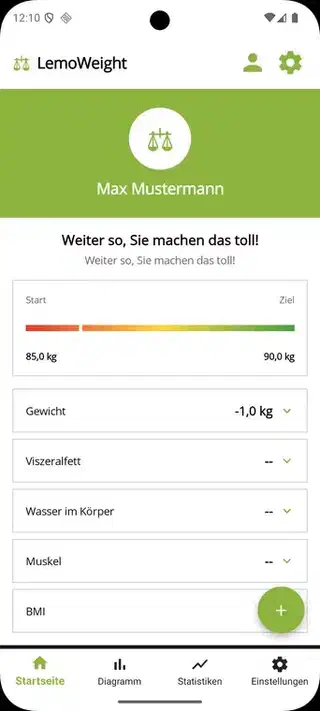
Das Ergebnis sieht schon ziemlich ähnlich dem Mockup vom Designer aus. Lediglich das Icon entspricht nicht dem Entwurf, sondern stammt aus der Material-Icons-Sammlung.
![Eugen [WebDucer] Richter](/media/authors/me_hu_ed050f6e4cdcc955.webp)
Ähnliches
- 05 - Entwicklung einer App mit KI per Spezifikation, Review und Korrekturen
- 04 - Entwicklung einer App mit KI per Spezifikation, Implementierung
- 03 - Entwicklung einer App mit KI per Spezifikation, Projektanlage
- 02 - Entwicklung einer App mit KI per Spezifikation, das Setup
- 01 - Entwicklung einer App mit KI per Spezifikation, die Idee